I meant to write about Home Assistant three years ago
In my first post back in August 2023, I said I wanted to document my Home Assistant journey. I said it again in April 2024, when I promised separate posts about the things I had been doing around the house. Apparently I needed another two and a half years to make good on that. At least the subject has given me plenty to write about in the meantime.
I have always been interested in smart homes, but looking into Aqara switches quickly sent me down a rabbit hole of neutral wiring, device compatibility and protocols that did not seem particularly interested in talking to one another. Home Assistant looked like the place where I could bring the pieces together and decide how the house should behave, rather than build around each manufacturer’s app.
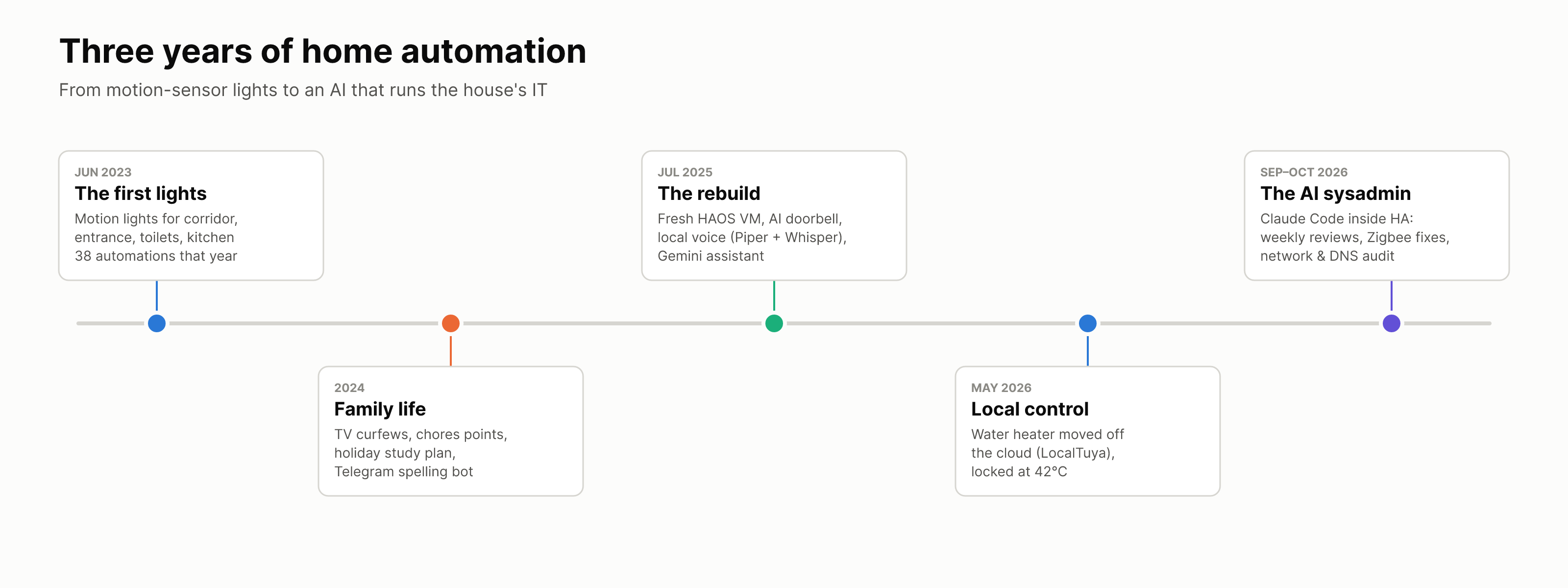
My proof of concept ran on a virtual machine on my desktop in our old home. I started with a handful of switches and the sort of lighting automations you can explain to anyone: motion turns on the corridor, entrance or toilet light; nobody is there, so the light goes off. The first of those went in around June 2023. It was small enough to pull apart when something went wrong, which was a good thing because I was still figuring out what I wanted from the system.
When we moved in September 2023, I had a chance to do the new place properly. I asked the electrician to run neutral wiring throughout the house so the switches would suit the smart home setup I had in mind. I had already bought a Synology DS923+ at an IT show in June and spent the summer setting it up. After the move, I recreated Home Assistant OS on a virtual machine on the NAS. The desktop experiment had done its job; the new house gave me room to keep going.
I spend a lot of my working life trying to untangle problems and make systems run better. It turns out I bring that habit home too. The difference is that at home, the users are my family, and they have every right to complain if my clever idea turns the lights off while somebody is still in the toilet.
What I mean by automation
I have a slightly stubborn view of what counts as automation. If I have to say “Hey Google, turn off the lights” every night, I have built a voice-controlled switch. The voice command might be convenient, but the person is still doing the remembering and the deciding. Home Assistant uses triggers under the hood, of course. My point is that I do not want somebody in the family to have to be the trigger each time. The house should notice the time, the weather, whether a room is occupied or whether we are heading home, then do the sensible thing.
The test I keep coming back to is embarrassingly simple: does this remove a little job from our day? If it means we can all be a bit lazier without the house becoming annoying, I think the automation has done its job. Four kids and two adults generate enough jobs on their own.
Lights, blinds and a warm shower
Some of the original lighting ideas are still among the most useful. The corridor and entrance lights respond to motion when it is dark, including when a thunderstorm makes the afternoon feel like evening. In the kitchen, a softer LED strip takes over late at night instead of lighting up the whole room. Toilet lighting uses both motion and the door state, with a failsafe so a missed sensor event does not leave a light on forever.
For the toilets I borrowed the “wasp in a box” idea: a PIR sensor tells the system somebody moved inside, while the door sensor gives that movement context. If the door is closed after movement, the system should not assume the room is empty just because the PIR has gone quiet. When the door opens and motion clears, the light and fan can switch off without somebody having to remember. It is still imperfect in one toilet, especially when somebody stands still or takes a shower, so I want to improve the occupancy logic with humidity as another clue. I am not going to pretend that every “smart” light in this house is already smarter than its users.
The same principle goes beyond lighting. Switches that are easy to forget have their own shut-off rules. The balcony blinds have controls for fully up, fully down and halfway, while the rain forecast also moves them automatically without anybody checking the weather app first. The water heater is under local control rather than relying on Tuya’s cloud. When my phone’s location tells Home Assistant I am heading back from the gym, it preheats the water so it is ready when I get home instead of running all day just in case. These are the little things that make the house feel helpful rather than merely connected.
The bigger change came when I stopped thinking only about devices and started thinking about our daily routines. With four kids, there are a lot of small things that need repeating. Home Assistant helps with TV time on school days and holidays, while leaving us a way to override the rules when real life calls for it. The kids have a chores dashboard with points and demerits. During school holidays, the house can announce the next part of the day’s plan instead of leaving one of us to repeat it.
I also run AdGuard Home as part of the home network. I already apply DNS-level rules per device to control YouTube and other services, including devices the kids use. The Home Assistant companion app on my phone lets me check or change that through HA, while the house can tie access to its routines as well. A TV can turn itself off when its time is up; DNS rules address the same problem on phones or other screens. A manual override is there when we need one, but I would rather set the rule once than spend every afternoon repeating it.
The spelling assistant
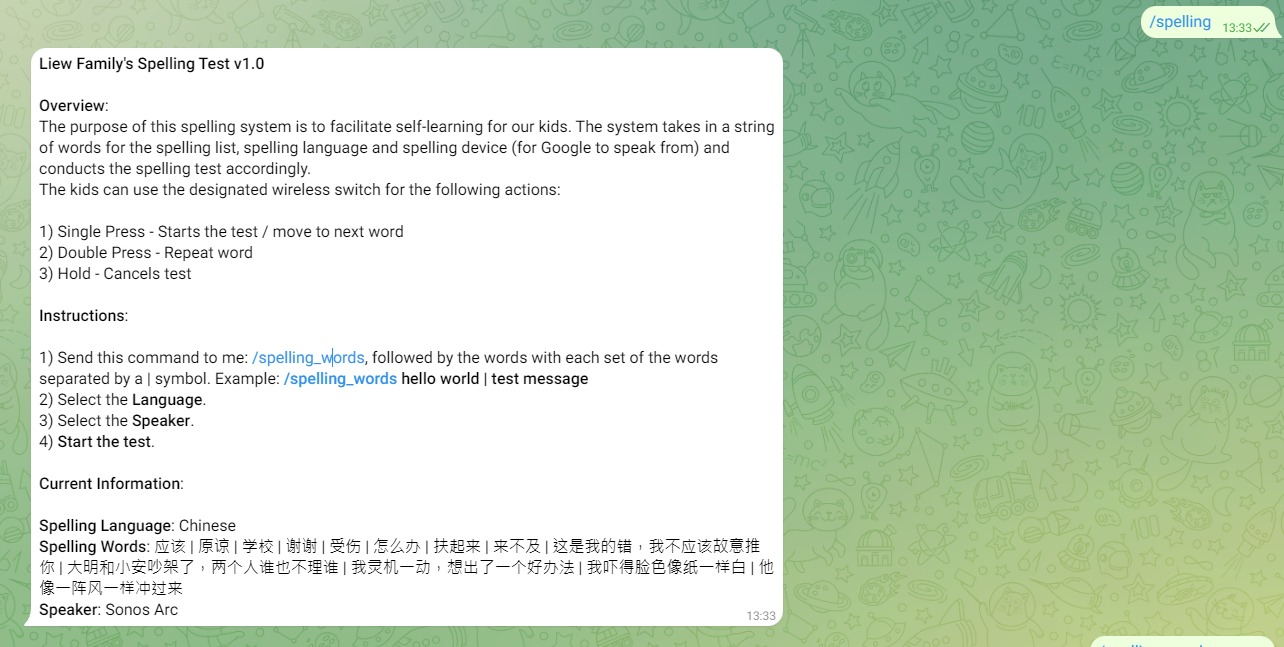
One of my favourite family projects is a spelling and dictation assistant that joins Home Assistant to Telegram and the speakers around the house. I can set the word list, language and speaker in the Home Assistant interface, but I also made Telegram another way to configure it. I send a pipe-separated list with /spelling_words, select English or Chinese, choose the speaker and start the test. The kids use a wireless switch to move to the next word, repeat one or cancel, while the house speaks the list.
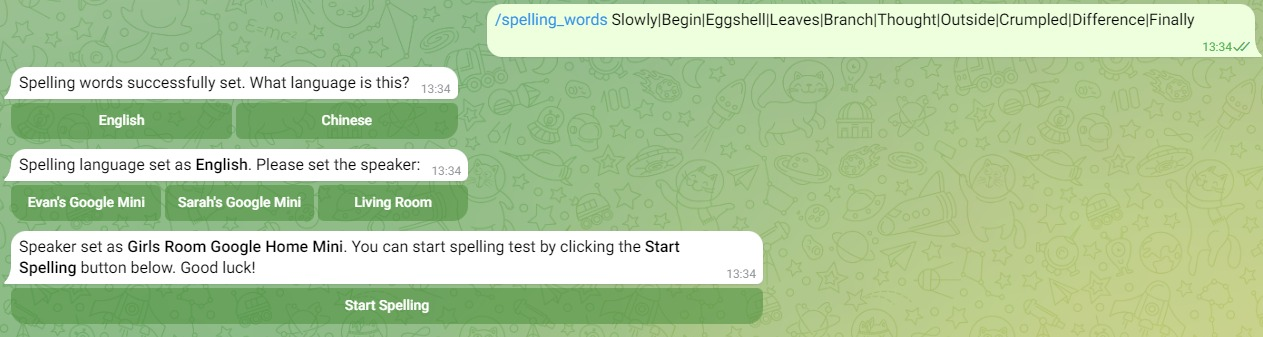
I know this one starts with a person choosing the words. That is fine: the input is a decision we actually want to make. Once the test begins, nobody needs to stand there reading each word aloud or manage the pacing for every child. That is the part I wanted the system to take over.
What the setup looks like now
As of October 2026, Home Assistant has 95 automations, 24 scripts and around 162 devices across 46 integrations. Zigbee and Z-Wave handle many of the switches and sensors, while the rest come through Wi-Fi, Bluetooth and local integrations. The HAOS virtual machine still sits on the Synology NAS. I use Zigbee2MQTT and Z-Wave JS UI for the two meshes, with dashboards for the parts of the house we actually need to see.
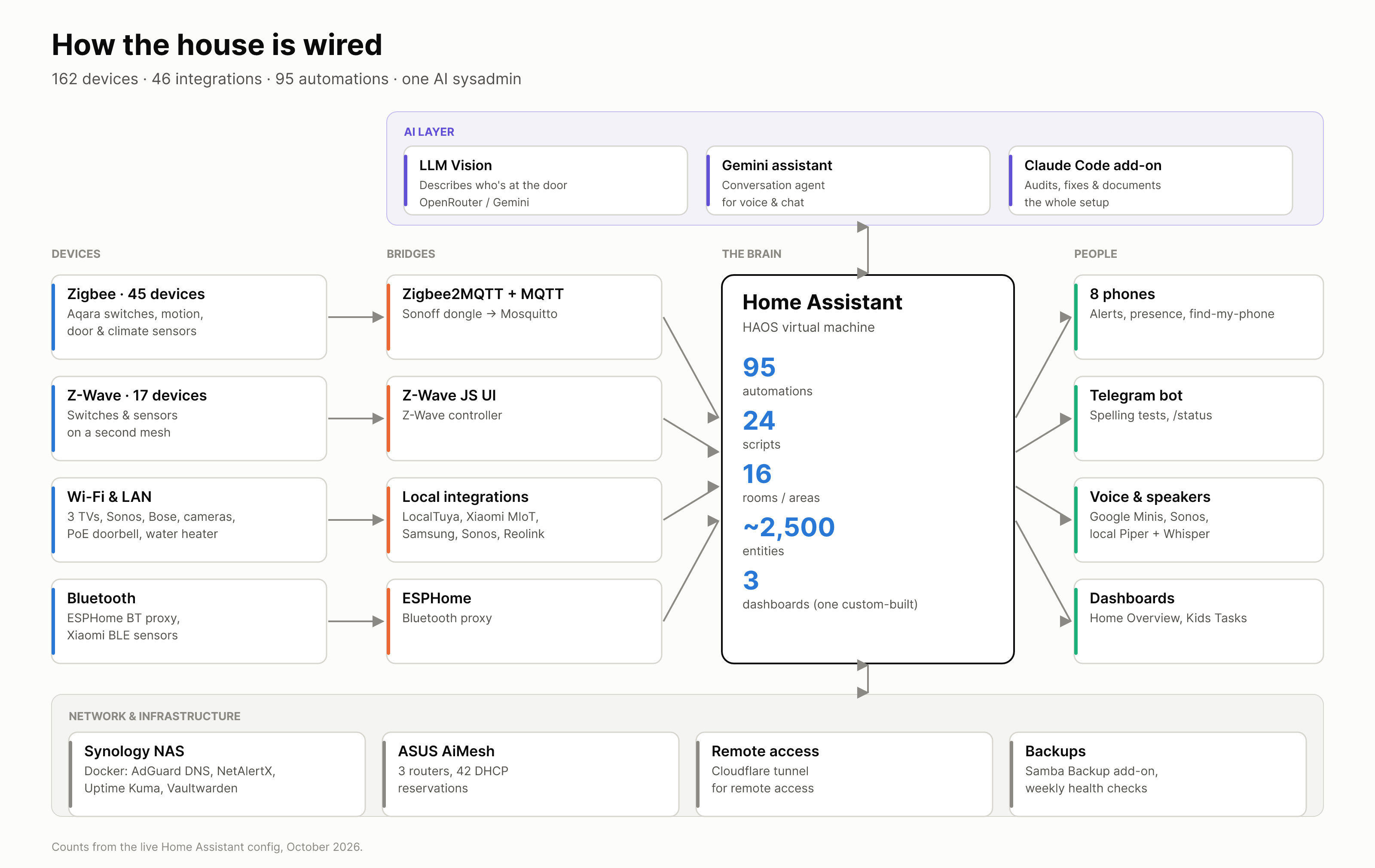
Those numbers sound more deliberate than the process really was. I did not sit down with a plan to reach 95 automations. They accumulated because a light needed a better condition, a family routine needed a reminder, or something that worked on a good day failed on a busy one. The split is probably a better description of the house than the total:
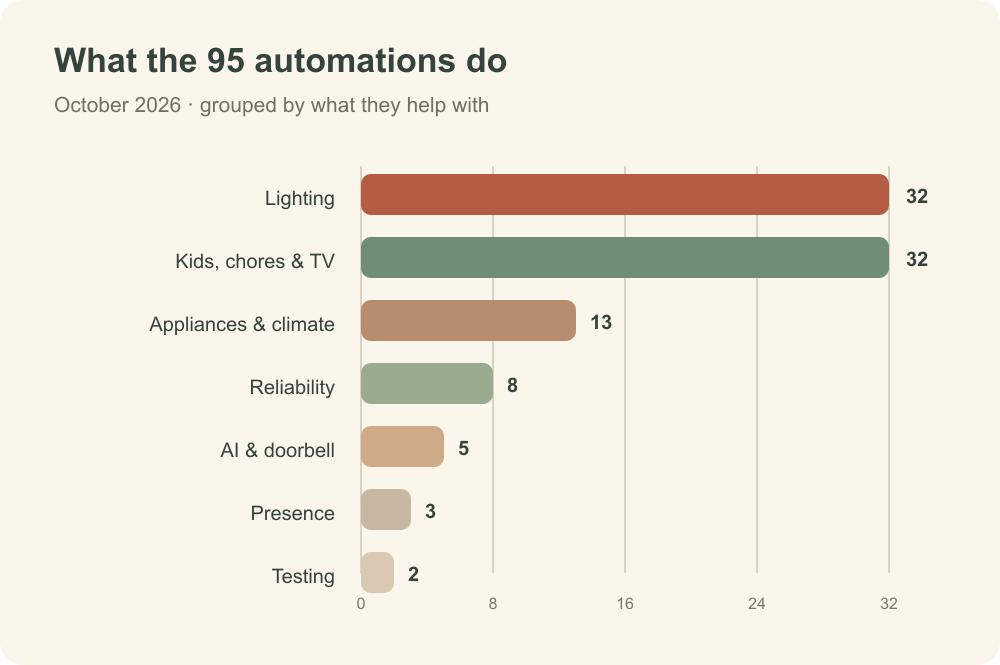
The 2023 and 2024 years account for most of the new automations. Since then I have spent more time rebuilding, fixing and maintaining things than adding new ones. In July 2025 I gave the HAOS virtual machine a fresh rebuild. That opened the way for local voice, an AI-assisted doorbell and a cleaner setup for the parts that had grown untidily around the original experiment.
Home Assistant has also become the main brain of my home network. The router tells me which devices are connected while NetAlertX helps identify what is actually there; AdGuard shows what those devices are asking DNS to resolve and applies the access rules. Each tool sees a different piece of the picture; Home Assistant gives me one place to bring them together for checks, notifications and decisions. That matters when a device changes address, a rule stops matching or something unfamiliar appears. I can look at the network as part of the house rather than keep three separate dashboards in my head.
The setup is useful when I am away too. If something urgent comes up, I can wake my PC at home through Home Assistant and then connect to it with Parsec. Tailscale gives me a private way back to the other devices and services on my home network. I like knowing that a last-minute job does not have to wait until I am physically in front of the machine.
I built a custom Home Overview dashboard as well. It pulls from the room and device registry to show the things I care about without hunting through several screens: room controls, weather, low batteries and a few common actions. There is also a separate view for the kids’ tasks. The dashboard is one of those things that looks simple only because there is a fair bit going on behind it.
The bits that needed a rethink
The doorbell is a good example of why “more intelligent” does not automatically mean “more useful”. When somebody presses the Reolink doorbell, Home Assistant takes a snapshot and an AI model can describe what is happening before sending a notification. I experimented with teaching it familiar faces. In testing, one model misnamed three out of four people, and it sometimes confused visitors with family members. A wrong name in a notification is worse than a useful description with no name, so I switched naming off. It now describes the scene without trying to identify the person.
There are less glamorous lessons too. A cheap motion sensor cannot see somebody who is standing still. Device names and old rules drift out of date. A switch can look fine on a dashboard while the behaviour behind it has quietly stopped making sense. I have learned to build in manual overrides, keep an eye on backup status and spend time on maintenance before adding the next idea.
Claude Code changed the way I run it
The biggest change lately has not been another sensor. I brought Claude Code into Home Assistant as an add-on and gave it access to the information it needs to understand the setup: entities, logs, configuration and the services around HA. It feels rather like having a personal assistant for the house. I can describe a problem in plain language, let it trace the relevant automations and devices, then ask it to fix or improve the part that is wrong.
I no longer sit down to hand-edit the dashboard, an automation, or a YAML or script file whenever I want something changed. Claude does the digging and much of the editing. If a light behaves strangely, it can follow the sensor states and rule logic instead of leaving me to spend an evening searching files. If I want a dashboard view changed, I can explain the outcome I want and review what it produces. Debugging has become much less of a chore because the dirty work of finding the cause is handed off.
I have also put the repetitive maintenance into a skill: a weekly review, a self-audit and a standing prompt to ask whether an automation still makes sense for how we actually live. The ordinary checks cover things such as offline devices, batteries, backup status and the health of the Zigbee network. The more useful questions are often less mechanical. Is a rule still solving a problem? Has a child’s routine changed? Could two separate bits of logic be one better automation? Having the system ask those questions regularly is better than waiting for somebody to complain.
I still decide what should happen in our home and I review changes that affect the family or the network. Claude has not replaced the judgement behind an automation; it has removed much of the tedious work between the idea and a working version. I have enjoyed coding since I was a kid, so I did not expect to enjoy handing over so much of it. Building is fun, but I am finding that orchestrating the work can be even better.
Still very much in progress
There are things I want to fix next: the toilet occupancy problem, some older Zigbee plumbing and the integrations that make upgrades more awkward than they should be. I also expect the kids to find new ways to make my carefully planned routines obsolete.
I started with a few switches because I wanted the devices in our home to work together. Three years later, what has kept me interested is the gap between a rule that looks smart on screen and one that genuinely helps six people get through a normal day. The best result is often that nobody notices what HA did. The blinds moved before the rain, screen time ended without me policing it, the forgotten switch turned itself off and the shower was warm after the gym. On a good day that feels almost god-like. On a bad day, somebody is waving at a PIR sensor in the toilet.
I have also written about the Synology NAS and the self-hosting rabbit hole behind this setup. The exact HAOS VM build probably deserves a post of its own. If I say “soon”, please check back in another three years.